
In this short ‘episode’ of sorts I discuss my frustration with trying to upgrade my airports from International to Intercontinental.
Airport Upgrading Task
The airport upgrading task can be a bit daunting. Generally speaking I build Hub International airports from the ‘get go’ and do not bother upgrading to the larger Intercontinental.
This time I decided to go ahead and do the upgrade but ran into a problem that I will get into a bit later.
For now let me go over the task and some of the obstacles I encountered.
The issue I have with upgrading the airports is partly with the number of airplanes in play. Several airplanes are circling around in a holding pattern. A number of others are simultaneously loading and unloading. This makes it nearly impossible for me to find a moment when the airport is vacant so I can safely delete the old one, clear way for the new, bigger one, and build the new one while also joining it to the neighboring bus and truck central station. It is basically impossible…
Close Airport Feature
There is a built in feature that allows closing the airport temporarily and not affect the airplanes. It puts them in a holding pattern. The feature includes a ‘Close airport’ button on the bottom of the existing airport view window. That helps tremendously as at least no airplanes can land and interfere with removing and adding in a new airport.
The Airplanes already on the ground in the airport still need to finish loading and unloading and taxi out and take off before the airport can be locked down and replaced, however.
Town Lack of Cooperation
My next challenge in replacing an airport is with removing the old airport and clearing some extra area for the larger airport.
The town likes to automatically start adding roads and buildings into the area that is cleared so it is necessary to deal with that as well.
Planning the extra room for a larger airport but also deciding on the orientation of the airport while staying within range of the bus and truck stations for joining them is the next task.
Succesful Upgrade
With some work and a few pesky extra building clearings it is now possible to finally lay down the new airport.
All the airplanes that have been in a holding pattern can start to land and do their thing. Whew!
‘Close Airport’ Issue
The issue I ran into, however, and what prompted me to tell my story is because that handy ‘Close airport’ button was not there on 3 out of 10 of my airport windows… I had to research why some airport windows had the button and others did not…
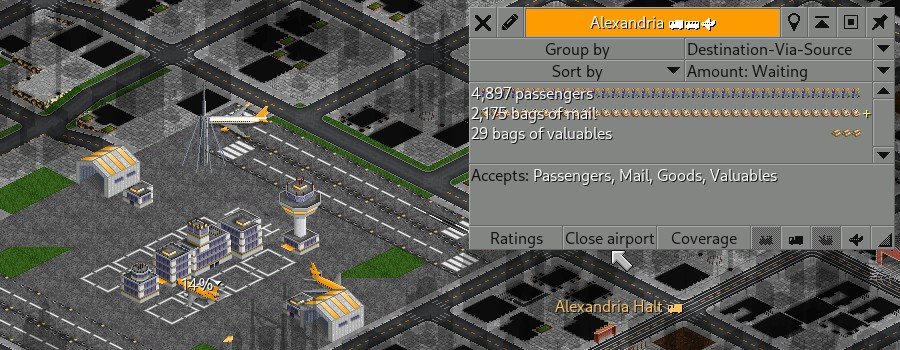
Issue Detailed Explanation
Here is exactly what happens behind the scenes:
- Two Windows, Same Name: OpenTTD has two completely different windows that look almost identical and share the same station name. One is the Station View (for managing cargo and the overall hub), and the other is the Airport View (specifically for managing the physical airport hangar and runways).
- The Invisible Target: When I first clicked, I likely clicked on a runway tile, a nearby bus stop, or the floating station name sign. This forces the game to open the Station View, which completely lacks the ‘Close airport’ button.
- The Locked Window: Once that Station View window was open on my screen, clicking on the airport again would not change the window type. It just brought the already-open Station View to the front of my screen.
By closing the window entirely and reopening it, I reset the target. When I clicked back on the airport, the game finally registered that I was clicking the airport infrastructure and gave me the correct Airport View with the ‘Close airport’ button.
Conclusion
If you run into this anomaly or glitch while you are trying to upgrade your airports, you now know why it can happen and how to fix it! (also see Master Hellish’ video: Switching to Large Airports)
Happy airport upgrades!