
One of my biggest hurdles in the game is upgrading my railways. I like Monorail but it is not available until 1999 and I usually start in 1965 when I can at least have most of the basic trains I want as a minimum. Before that they are quite slow and under-powered.
Waiting for 1999
While I wait for 1999 I start using basic rails or electrified rails if I want to get going with trains early on and later do an upgrade to Monorail.
Typically when I start using the basic rail is fine especially if I want to haul coal to power stations in fairly close proximity. I keep the design simple but leave myself room to later come back and improve the tracks and stations along with better engines.
Railways Upgrading
I have found is two ways to make my railway networks easier to upgrade:
- Turn off electrified rails in advanced settings or I can use basic rails up until I have Monorail to upgrade to. Steam, Diesel, and Electrified trains can then use the same rails and there is no need to change anything until 1999 when Monorail becomes available. (see Electrified Rail Exploit below for the details)
- Use Universal Rail Type (NewGRF) from the get go and never change tracks if I do not want to. Problem solved! Or I can also use Universal Rail to help upgrade later on. (see Universal Rail Exploit below for a more detailed explanation)
Electrified Rail Exploit
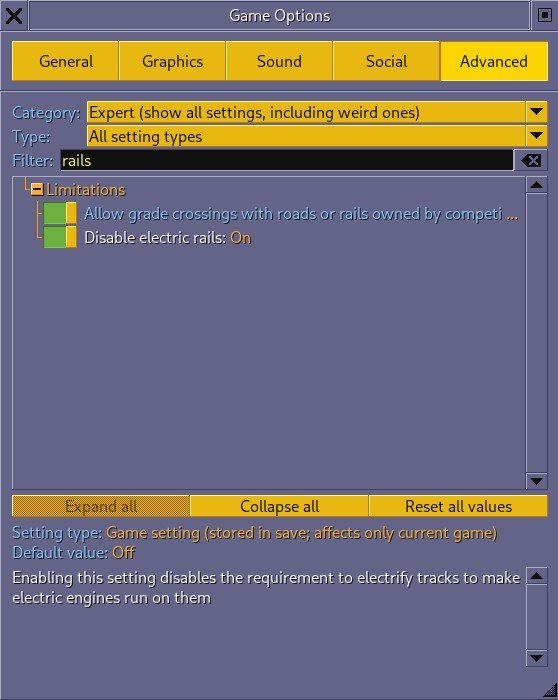
In advanced setting you go to the Gear Icon, then Game Options and then the Advanced Settings tab. In there you can search for rails and then in Limitations you will see, “Disable electric rails”. Set it to On and you will avoid having to use Electric rails for electric type vehicles.
Universal Rail Exploit
The Universal Rail Type NewGRF allows you to never have to upgrade your tracks! Personally that is what I use from 1965 until 1999 when I changed over to Monorail.
This allows me to either:
- a) never change tracks, or
- b) facilitate changing tracks and vehicles throughout the game
Personally, I like the look of Monorail and like the higher speed limit with MagLev so I go with option ‘b’.
Step-by-step Instructions:
- 1. Add the Universal Rail Type (NewGRF) that is available in Online Content. You can access that before starting a game. You check it, download it, and select it in the NewGRF Active choices screen to make it usable in the game.
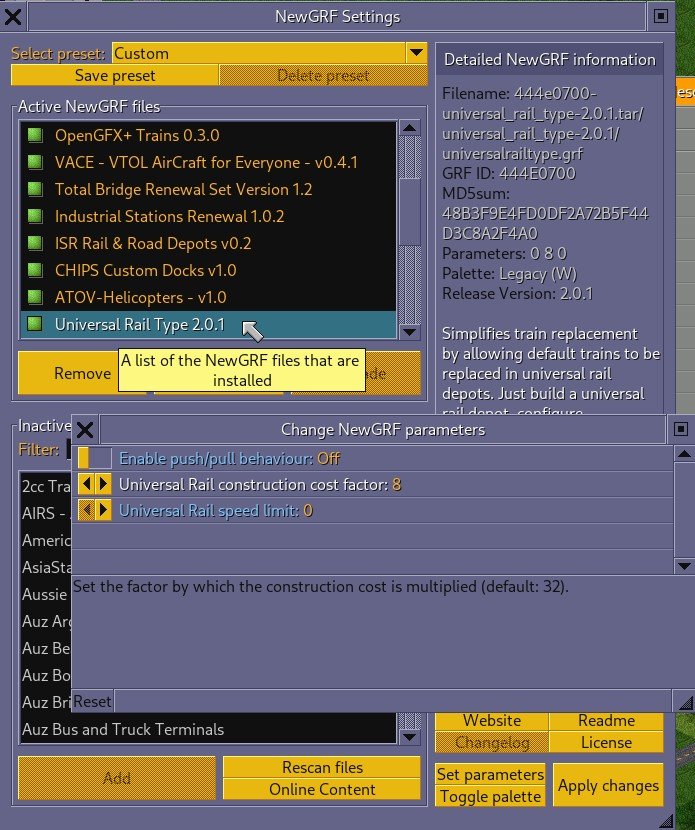
- 2. Set Parameters before starting your game to make Universal Rail more powerful (see image below):
- Cost Factor: set the cost to
8if you want the tracks to cost the same as ‘Normal’ tracks.0is actually zero cost,8is ‘normal’,16is double what normal is,32is four times what ‘normal’ is.32is the default setting. - Speed Limit: set the speed limit to
0. This means no speed limit. The speed limit is in km/h. I have always used0which is the default setting. - Push-Pull Behavior: I have it off as I have never used that behavior. That would be up to your discretion.
- Cost Factor: set the cost to
- 3. The Depots to do the Magic
- Now that you have the NewGRF in place and the parameter set, the final step is to control the upgrades by sending the trains to depot while the tracks are upgraded. Since the depots are Universal you can upgrade the trains to any of the 4 track types: Normal, Electrified, Monorail, or MagLev. You can then upgrade your tracks or, in fact can degrade as well by selecting the track type you want and using the upgrade tool.
- The trick is to not upgrade/ change the Universal depots. Just do the tracks and stations once all the trains are in the depots.
- 4. Centralized Shared Depots
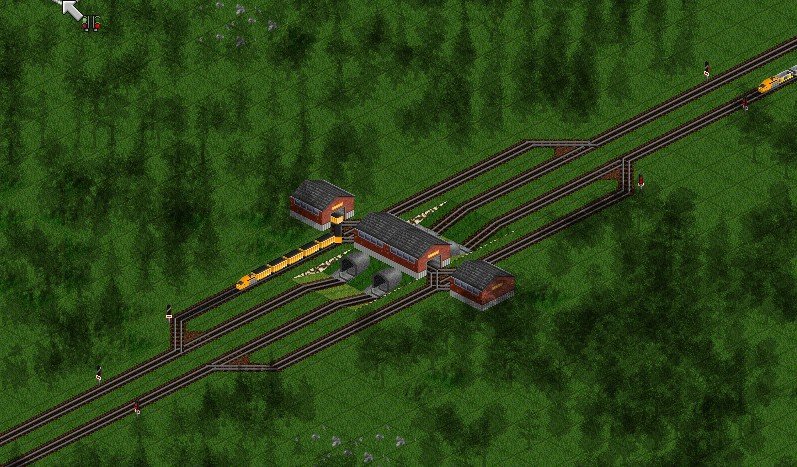
- Utilizing Master Hellish’s bypass loop design for a trunk line completely solves the gridlock that usually happens when trains slow down to enter a depot.
- By grouping the train depots into centralized “service hubs” right off the main line, you gain a massive logistical advantage.
- Instead of hunting down dozens of isolated depots hidden behind urban stations, you only have a few highly visible, multi-track service stations to manage.
- When you transition your mainline and stations to Monorail, you do not touch the service loops. The Universal Rail depots keep servicing your existing fleet without a single day of network downtime.
- When MagLev unlocks, you simply build your new MagLev replacement trains inside those exact same Universal Rail depots and send them right onto the newly upgraded tracks.
Not valid for VacTrains
Because vactrains use an entirely separate, specialized track type (the vacuum tube), they are completely incompatible with standard rails, Monorail, MagLev, and Universal Rail. (see below for an exception with a vactrain set newgrf)
Because the game engine strictly forbids upgrading a track tile if a non-compatible vehicle is currently occupying or routed to it, the upgrade requires a total network teardown and rebuild.
- 5. Vactrain Procedure Checklist
- Send to Depot: Use your train list to order all trains on that specific line to head to their nearest service hub.
- Sell the Fleet: Once they arrive, click Sell All Vehicles inside the depot. You cannot use the “Autoreplace” tool because a standard train cannot physically transform into a vactrain while sitting on a non-vac track.
- Convert Infrastructure: Open your new Vactrain Construction Toolbar and select the Convert Rail tool (the magnet icon). Drag it over your entire network to instantly swap the tracks, bridges, stations, and depots into vacuum tubes.
- Rebuild & Clone: Buy your brand-new vactrain engine and cargo vacuum elements. Recreate your route orders once, then hold Ctrl and click Clone in the depot to instantly build your new fleet with shared orders.
- 6. Exception: The JGR Patchpack Template Tool
- If you are playing on the highly popular JGR Patchpack version of OpenTTD rather than the vanilla build, you can bypass this headache using the Template Replacement tool.
- You can create a “Template” that says “Replace Train X on Universal Rail with Vactrain Y on Vactube Rail.”
- The patchpack will automatically force the trains into the depots, sell the old ones, upgrade the depots, buy the new vactrains, copy the orders, and send them back out automatically.
Conclusion
If you play vanilla and stick to Normal, Electrified, Monorail or MagLev, the earlier Universal Rail Exploit works really well. Adding shared depot hubs instead of depots at every station takes that to the next level.
Later in your game if you want to add vactrain you will have to do a more extensive changeover but are able to use MagLev trains on vacuum tube rails. For details see Vactrain Upgrade.
I hope this detailed view if upgrading your train network is clear and what you were looking for. If you see an error or have something to add please contact me and I will do my best to fix it or expand it as necessary.
P.S. An update: Yes you can use MagLev trains on vacuum tubes tyle lines with the help of the Vactrain Set Fork 1.1.3 (see Vactrain Upgrade.)